I like my bash prompt:
to include the current Mercurial/Git branch if applicable – otherwise I would quickly get in big trouble with committing things to the wrong branch in Django etc.
to show the full current working directory - for similar reasons to above, as I often end up lost in a maze of twisty little directories, all alike.
to be always instantaneous (tricky, when 'hg branch' can take up to a second on a bad day due to startup time)
to work well with virtualenv (which adds the environment name to the beginning of the prompt)
to show the time (so that if I have a long running job that I didn't realise was going to be long running, all the info is there to find out how long it took).
to do all the above without confusing me!
All of these together mean I need two lines, but this has advantages - it means the commands I type always start at the same column. I achieve (1) by a bash function that looks for .hg or .git recursively, and looks for '.hg/branch' where applicable. I achieve (6) by using some colours distinguish the different bits.
The end product looks like this - first without a virtualenv, then with:
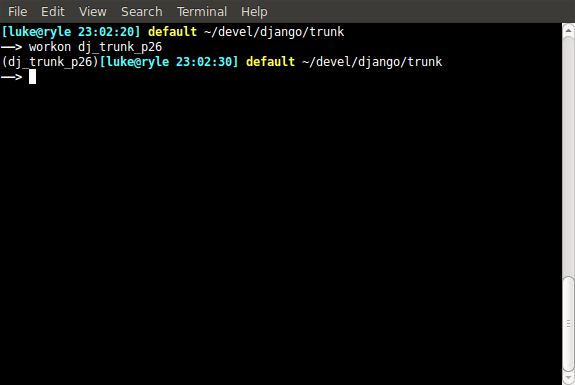
The code looks like this (in ~/.bashrc)
# Prints " $branchname" if in a hg or git repo, otherwise nothing.
print_branch_name() {
    if [ -z "$1" ]
    then
        curdir=`pwd`
    else
        curdir=$1
    fi
    if [ -d "$curdir/.hg" ]
    then
        echo -n " "
        if [ -f  "$curdir/.hg/branch" ]
        then
            cat "$curdir/.hg/branch"
        else
            echo "default"
        fi
        return 0
    elif [ -d "$curdir/.git" ]
    then
        echo -n " "
        git branch --no-color 2> /dev/null | sed -e '/^[^*]/d' -e 's/* \(.*\)/\1/'
    fi
    # Recurse upwards
    if [ "$curdir" == '/' ]
    then
        return 1
    else
        print_branch_name `dirname "$curdir"`
    fi
}

e=\\\033
export PS1="\[$e[1;36m\][\u@\h \t]\[$e[1;33m\]\$(print_branch_name) \[$e[0m\]\w\n\[$e[1;37m\]——> \[$e[0m\]"